
Payables, cash, tax records and the close
Know what you owe, when it is due, and whether the cash is there.
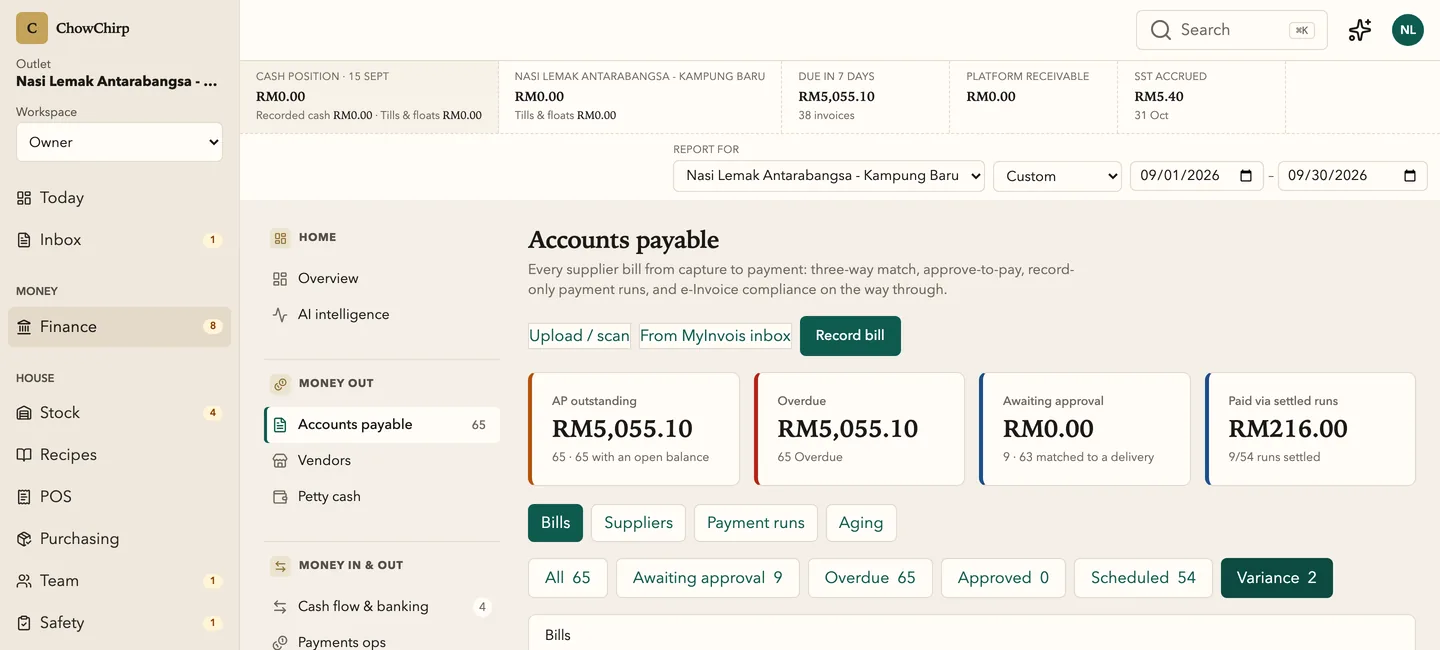
Every approved bill lands on one aging board, matched to its purchase order and delivery. Petty cash, cash position, SST and e-Invoice records and the month-end close live in the same place, with the evidence attached.

Who it is for
Owners who want to see the cash position before they approve a payment run.
Finance managers and bookkeepers who chase bills, credit notes and statements every month.
Accountants who need clean exports and a locked period.
What you can do
Age every bill
Current, 1 to 30, 31 to 60, 61 to 90 and 90 plus days. Each bill shows whether it matched its purchase order and delivery note, or where the variance is.
Resolve variances with a reason
Accept a variance as a manager, expect a credit note, or correct the purchase order or receipt. The choice is recorded on the bill.
Plan payment runs against your cash floor
Set a cash floor for the outlet. Build a payment run and see the projected position after it. Record settlements, disputes and write-offs as they happen.
Run petty cash without the shoebox
Staff log a claim with a photo of the receipt. Policy limits apply automatically: RM1,000 per entry and a receipt for anything above RM30. A leakage check lists approved claims with no receipt.
Watch the cash position
Record the position, expected inflows and recurring expenses. See the next 30, 60 and 90 days against the floor.
Keep SST and e-Invoice records in order
SST periods, issued and consolidated e-Invoice records and the supplier inbox are tracked step by step. Every screen says what was recorded and what was sent.
Close the month from a live checklist
The close checklist is built from payables, petty cash, SST, e-Invoice records, cash sessions and delivery reconciliation. Lock the period only when every item clears.
Export for your accountant
Operational profit and loss by outlet, aging, petty cash and payment exports in CSV, XLSX or PDF, in AutoCount and Xero friendly layouts. Each export lists the fields it redacts.
How it works
Bills arrive from the review queue
An approved invoice becomes a payable with its source document, tax lines and match status attached.
You decide what to pay
Sort by due date, check the cash floor, and record the payment run. Settle in your bank as usual and record the outcome.
Close and export
Work the close checklist, lock the period, and send the accountant an export that imports cleanly.
Built to be checked
- Petty cash policy is enforced in the product: RM1,000 maximum per entry, a receipt required above RM30, and a RM500 float target. In the product
- The month-end checklist only shows items you are allowed to read. It never marks an item done that it cannot see. In the product
- Exports carry their renderer version, a confidence figure with its basis, and a list of redacted fields. In the product
Honest limits
Frequently asked questions
Is this an accounting system?
No. It is operational finance for running the restaurant: what you owe, what you have and what it cost. Your accountant keeps the general ledger. ChowChirp exports to it.
Can it pay my suppliers?
Not yet. Payment runs are planned and recorded here, and you pay through your bank. The record shows who approved what and when.
How does the SST screen help if it does not file?
It assembles the period from the tax lines on every bill and sale, shows the liability and the evidence, and gives your accountant a clean starting point. The filing itself is your accountant's act.
What about e-Invoice?
Issued, consolidated and self-billed records are tracked with their validation details. Where a MyInvois connection is configured, consolidated submissions can be sent. Nothing is shown as validated unless LHDN returned a validation.
Related modules
Invoices and documents
Supplier invoices, credit notes and delivery notes go from a photo to an approved bill in one screen. The AI fills the fields, a person checks the exceptions, and one approval posts to payables and stock.
Purchasing
Requisitions, purchase orders, quotes, supplier comparison and receiving in one numbered pipeline. Every order carries Malaysian tax codes and links forward to the delivery and the invoice.
Owner dashboard
The owner dashboard pulls the work from every outlet into one prioritised list. Alerts, corrective actions, crisis reports, exports and the audit explorer sit behind it. Every figure opens to the entry that produced it.
See ChowChirp on your own invoices.
A 30-minute walkthrough on a screen share. Bring three real supplier invoices and we will run them through the review loop live.