
The advisor
Ask why food cost moved. Get an answer with the receipts.
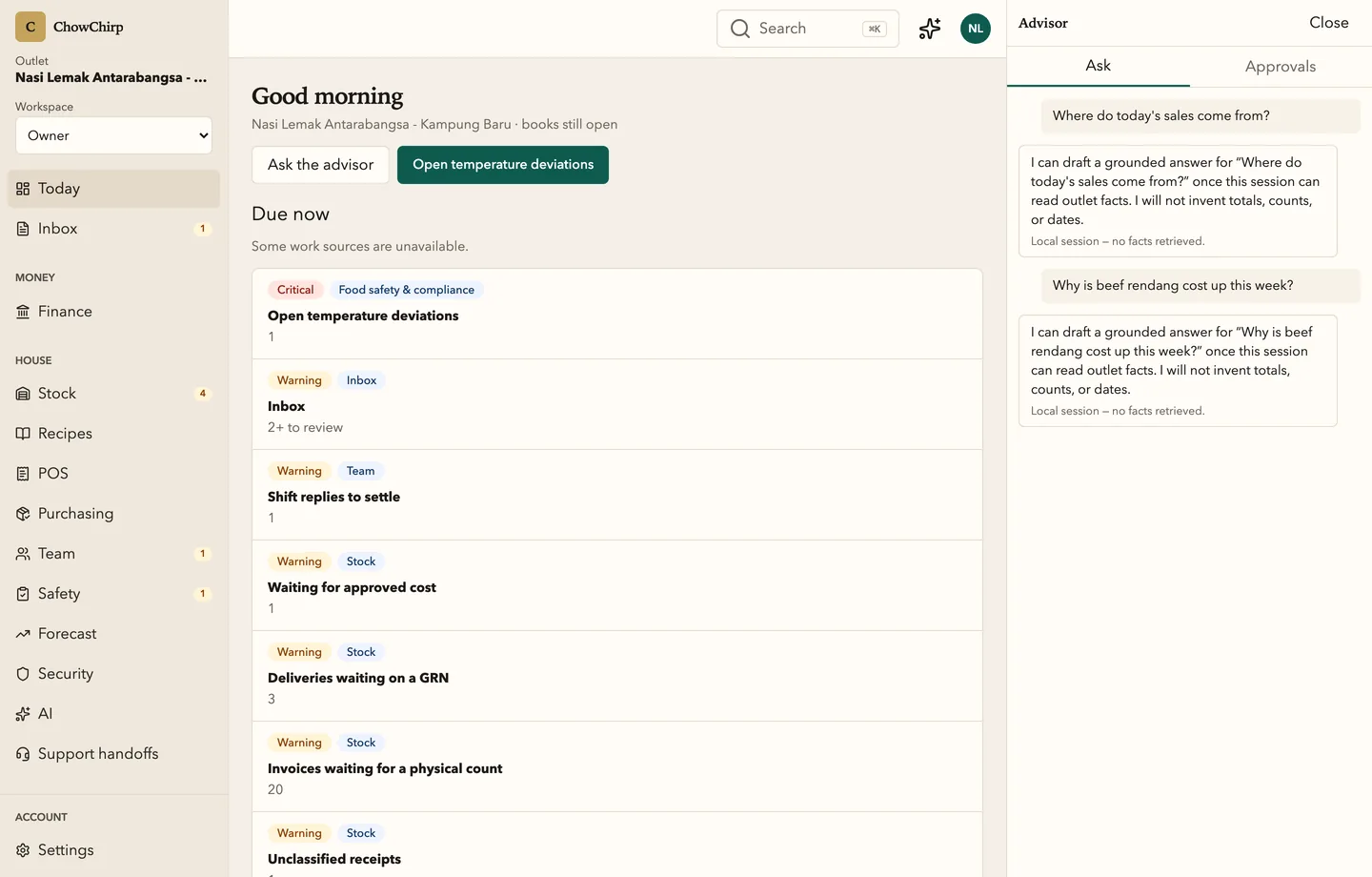
The advisor answers questions about your own numbers, cites the facts under every answer, and drafts proposals for a person to approve. It never posts, pays or files on its own.

Who it is for
Owners who want a straight answer at 11pm without opening five screens.
Managers who want a draft purchase review, not a blank form.
Anyone who has been burned by a confident wrong number.
What you can do
Ask in plain language
Open the advisor from any screen with Cmd+J. Ask about outlet health, cost movement, open alerts or what to check before close.
See the facts under the answer
Every answer streams with citations to the figures it used. If the connection to the model fails, the screen shows a clearly labelled local fallback instead of pretending.
Turn an answer into a proposal
A suggested action becomes a proposal card with the exact command, the payload and a before-and-after diff, marked exact or approximate.
Approve, edit or dismiss
Approve as is, edit the details with a written reason and a rollback note, or dismiss with a reason. Every decision is on the record with a name.
Ask the ledger
A finance-scoped advisor sits inside the money screens with its own attention queue.
Escalate to a person
Send a thread to a human support queue, cancel a run, or flag an answer for review.
Set up the daily briefing
A morning summary to a verified channel, enabled only with recorded consent and a reserved budget so chat can never starve it.
How it works
You ask
The question is answered from the same figures the dashboard shows, with the permissions of the person asking.
It cites
Facts appear first, under the answer. Numbers are read from the product, not computed by the model.
You decide
Any action is a proposal. Nothing runs until a person approves it, and the approval is logged.
Built to be checked
- The assistant has read-only access to facts. Any action is a proposal that a person approves, edits or dismisses. In the product
- An edited proposal is refused if the edit is byte-identical to the original, and requires an edit reason and a rollback note. In the product
- The advisor rail never appears on kitchen or counter screens. In the product
Honest limits
Frequently asked questions
Which AI does it use?
ChowChirp uses leading language models through a provider layer, and reads only the facts your account can see. Invoice reading and the advisor use the same layer. We do not train models on your data.
Can it make a mistake?
It can misread a question or miss context, which is why every number is cited and every action is a proposal. When it does not have the data, it is built to say so and tell you how to get it.
Can staff use it?
Anyone with a login can ask within their permissions. It never shows a person figures they could not open themselves.
How is usage controlled?
Budgets are set per organisation with a reserved share for briefings. When a budget is exhausted the advisor says it is unavailable rather than silently cutting an answer short.
Related modules
Owner dashboard
The owner dashboard pulls the work from every outlet into one prioritised list. Alerts, corrective actions, crisis reports, exports and the audit explorer sit behind it. Every figure opens to the entry that produced it.
Finance and payables
Every approved bill lands on one aging board, matched to its purchase order and delivery. Petty cash, cash position, SST and e-Invoice records and the month-end close live in the same place, with the evidence attached.
Invoices and documents
Supplier invoices, credit notes and delivery notes go from a photo to an approved bill in one screen. The AI fills the fields, a person checks the exceptions, and one approval posts to payables and stock.
See ChowChirp on your own invoices.
A 30-minute walkthrough on a screen share. Bring three real supplier invoices and we will run them through the review loop live.