
Procurement
Order from the right supplier, send it on WhatsApp, and match it on arrival.
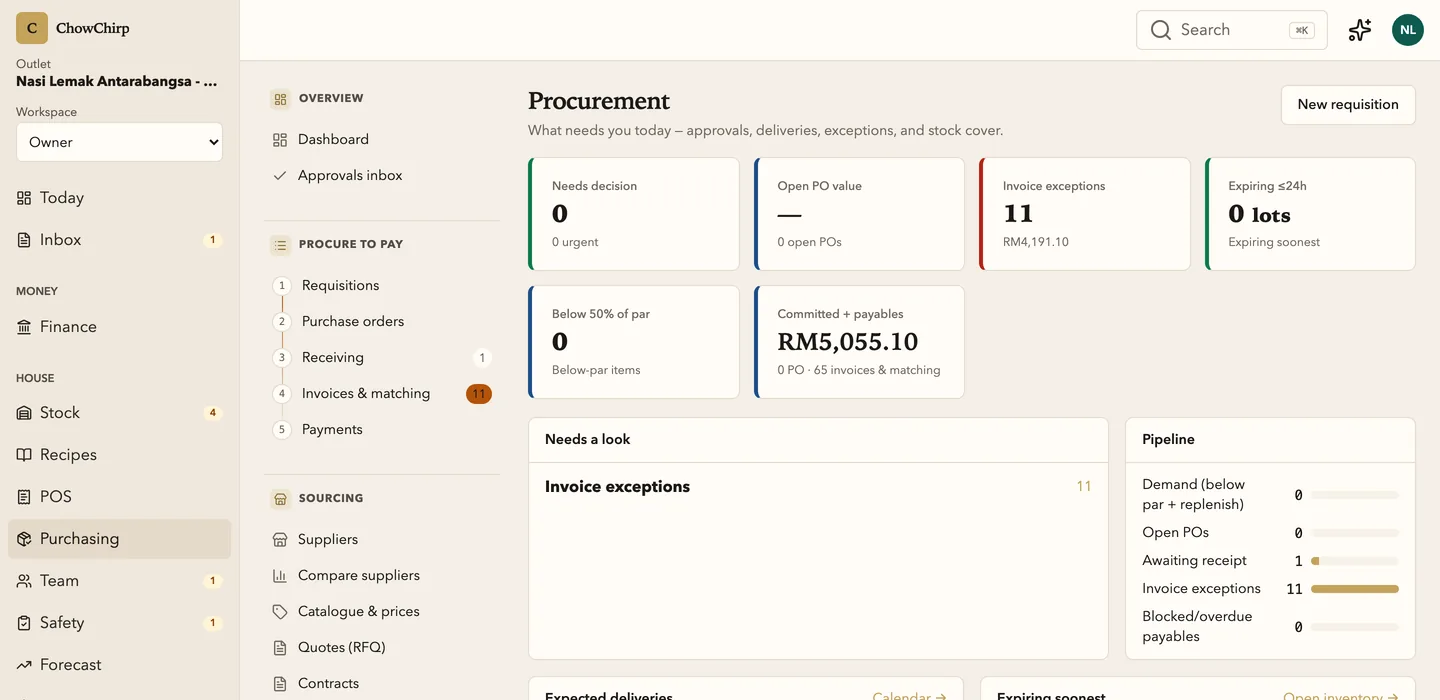
Requisitions, purchase orders, quotes, supplier comparison and receiving in one numbered pipeline. Every order carries Malaysian tax codes and links forward to the delivery and the invoice.

Who it is for
Managers who place the orders and receive the goods.
Owners who want to compare suppliers on price and reliability, not memory.
Groups with several outlets buying from the same suppliers.
What you can do
Follow one pipeline
Requisitions, orders, receiving, invoices and payments are numbered one to five in the sidebar, with live counts. You always know which step a purchase is on.
Raise purchase orders with the right tax
Lines carry SST 8%, SST 6%, exempt or out-of-scope codes. Most food ingredients carry no tax line, and the order says so.
Send the order the way suppliers read it
Mark an order as sent by WhatsApp text, WhatsApp document, email or by hand, and record the supplier's response when it comes back.
Get quotes and award them
Send a request for quotation to several suppliers, collect the responses with price, lead time, minimum order and validity, and award the best one straight into a purchase order.
Compare suppliers on facts
A grid of items against suppliers with a headline score and unit price in every cell.
Reorder from the order guide
Items below par are listed and selected into a pre-filled order. System replenishment proposals are approved, never auto-sent.
Keep contracts and price tiers on file
Record a supplier contract with its evidence and price tiers, then activate it. The server decides which contract is in force, so nobody can quietly switch it.
See the month on one calendar
Expected deliveries, quote closing dates and scheduled payment runs on a four-week grid with Malaysian public holidays marked.
How it works
Raise
A manager builds the order from the order guide or a requisition. Lines, units and tax codes are checked before it can be sent.
Send and acknowledge
The order goes out on WhatsApp or email. The supplier's reply, including changes to quantity or date, is recorded against it.
Receive and match
The delivery is received against the order. The invoice is matched to both. Variances are resolved with a reason.
Built to be checked
- Contract activation is locked to the server's selection, so a client cannot choose which contract becomes authoritative. In the product
- Illegal order transitions are disabled in the interface with the reason shown, mirroring the same rules the server enforces. In the product
Honest limits
Frequently asked questions
Does the supplier need to log in?
No. Suppliers receive the order on WhatsApp or email as they do today. Their reply is recorded by your team against the order.
Can the system order automatically?
No. It can propose a replenishment, and a person approves it. That is deliberate: nothing leaves ChowChirp without a name on the approval.
How does receiving link to invoices?
A delivery is received against the order, and the invoice is matched to both when it is approved. Variances show up on the bill with the reason you chose.
Related modules
Stock
Receive deliveries against purchase orders, count stock on a phone, log waste and transfers, and see what every balance is based on. Low-confidence numbers tell you which count would fix them.
Invoices and documents
Supplier invoices, credit notes and delivery notes go from a photo to an approved bill in one screen. The AI fills the fields, a person checks the exceptions, and one approval posts to payables and stock.
Finance and payables
Every approved bill lands on one aging board, matched to its purchase order and delivery. Petty cash, cash position, SST and e-Invoice records and the month-end close live in the same place, with the evidence attached.
See ChowChirp on your own invoices.
A 30-minute walkthrough on a screen share. Bring three real supplier invoices and we will run them through the review loop live.