
Dashboard, alerts, reports and the audit trail
One list of what needs you today, and a trail behind every number.
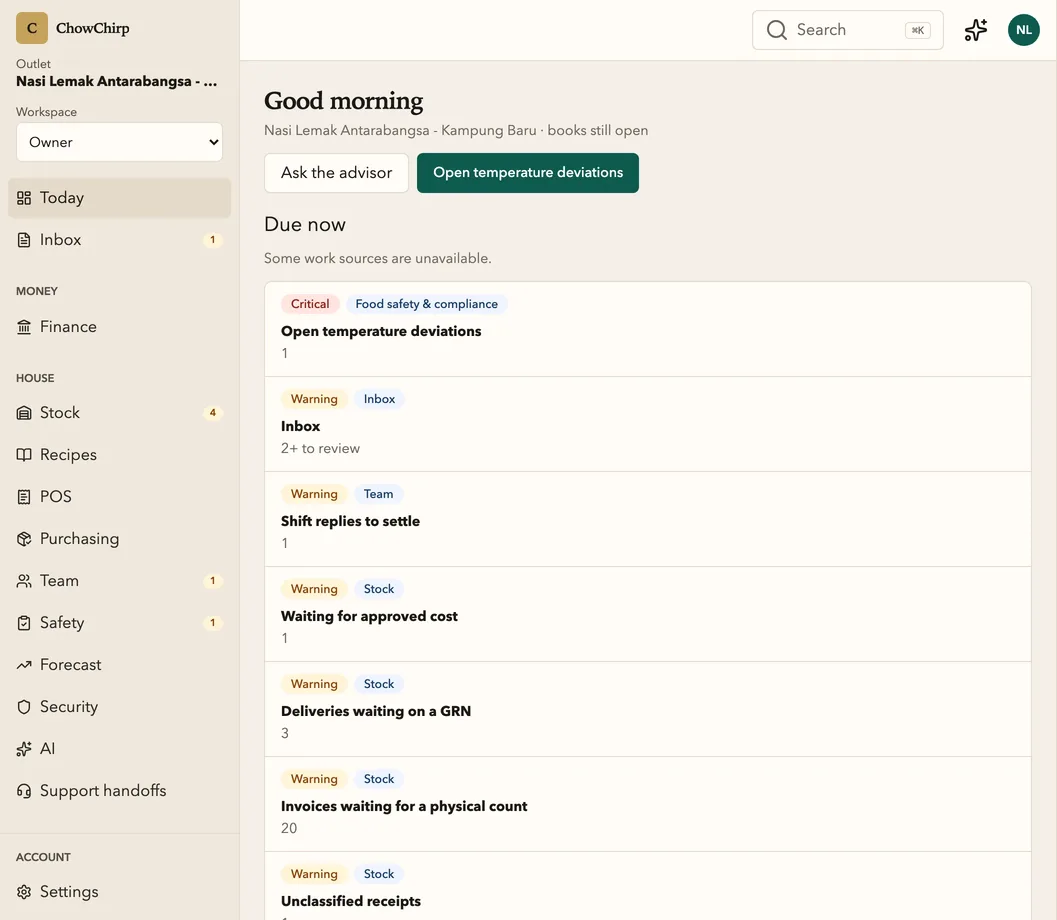
The owner dashboard pulls the work from every outlet into one prioritised list. Alerts, corrective actions, crisis reports, exports and the audit explorer sit behind it. Every figure opens to the entry that produced it.
Who it is for
Owners who check the business from a phone at night.
Area managers covering several outlets.
Anyone who has been told a number and wants to see where it came from.
What you can do
Start with what needs you
A single worklist drawn from every domain: temperature deviations, invoices waiting, deliveries without a note, shift replies to settle. Each row shows severity, area, amount if relevant, and opens the owning screen.
See the tiles that matter
Work needing you, today's sales, open bills and stock confidence. The sales tile shows a number only when ChowChirp captured the sales itself. It will not guess from a foreign POS export.
Work the alerts
Active, unacknowledged, acknowledged, snoozed and history. Acknowledge, resolve, snooze or mark a false alarm, singly or in bulk. Temperature alerts carry the two-hour and four-hour product decision.
Close the loop on corrective actions
Create, assign, start, complete and verify. After verification, record whether the fix actually worked.
Open a crisis report on a frozen fact set
When food cost blows out, the report pins its facts and breaks the variance into price, waste, shrinkage, negative balance, timing and residual.
Trace any number
The audit explorer filters the recent trail by domain, actor and event. Every command shows who, when, and what changed.
Export with the redactions listed
Every export declares its renderer, version, confidence and the fields it left out. Downloads use a one-time link.
Switch outlets, keep one trail
Filter any screen to one outlet or all. Managers see only the outlets they are assigned to.
How it works
Facts arrive
Every approval, count, punch and reading is a stamped entry with a name and a time.
The list ranks them
Anything that needs a decision rises to the top, by severity, with the outlet and the amount.
You drill down
Tap the row, then the number, then the entry. The trail ends at the photo, the count or the person.
Built to be checked
- The sales tile refuses to show a figure unless the outlet declared native order capture as its authority. In the product
- Crisis reports open only on a bound, hashed fact set with pinned evidence and metric versions. In the product
Honest limits
Frequently asked questions
Can I see all my outlets on one screen?
Yes. The dashboard and most screens accept an all-outlets view or a single outlet. Managers only see the outlets assigned to them.
Why is today's sales sometimes blank?
Because ChowChirp only shows a sales figure it captured itself. If your sales are still in another POS, the tile says so instead of showing a number it cannot stand behind.
How far back does the audit trail go?
The trail is kept for the life of your account. Business records are retained for seven years by default in line with Malaysian record-keeping expectations.
Related modules
AI advisor
The advisor answers questions about your own numbers, cites the facts under every answer, and drafts proposals for a person to approve. It never posts, pays or files on its own.
Finance and payables
Every approved bill lands on one aging board, matched to its purchase order and delivery. Petty cash, cash position, SST and e-Invoice records and the month-end close live in the same place, with the evidence attached.
Food safety
Temperature checks, cooking and cooling controls, cleaning runs, HACCP records, halal records, incidents and licences in one place. Generate an inspection pack for MOH, JAKIM, DBKL or MeSTI and share it through an expiring link.
See ChowChirp on your own invoices.
A 30-minute walkthrough on a screen share. Bring three real supplier invoices and we will run them through the review loop live.