
Documents and invoice capture
Photograph the invoice. Check three fields. Approve.
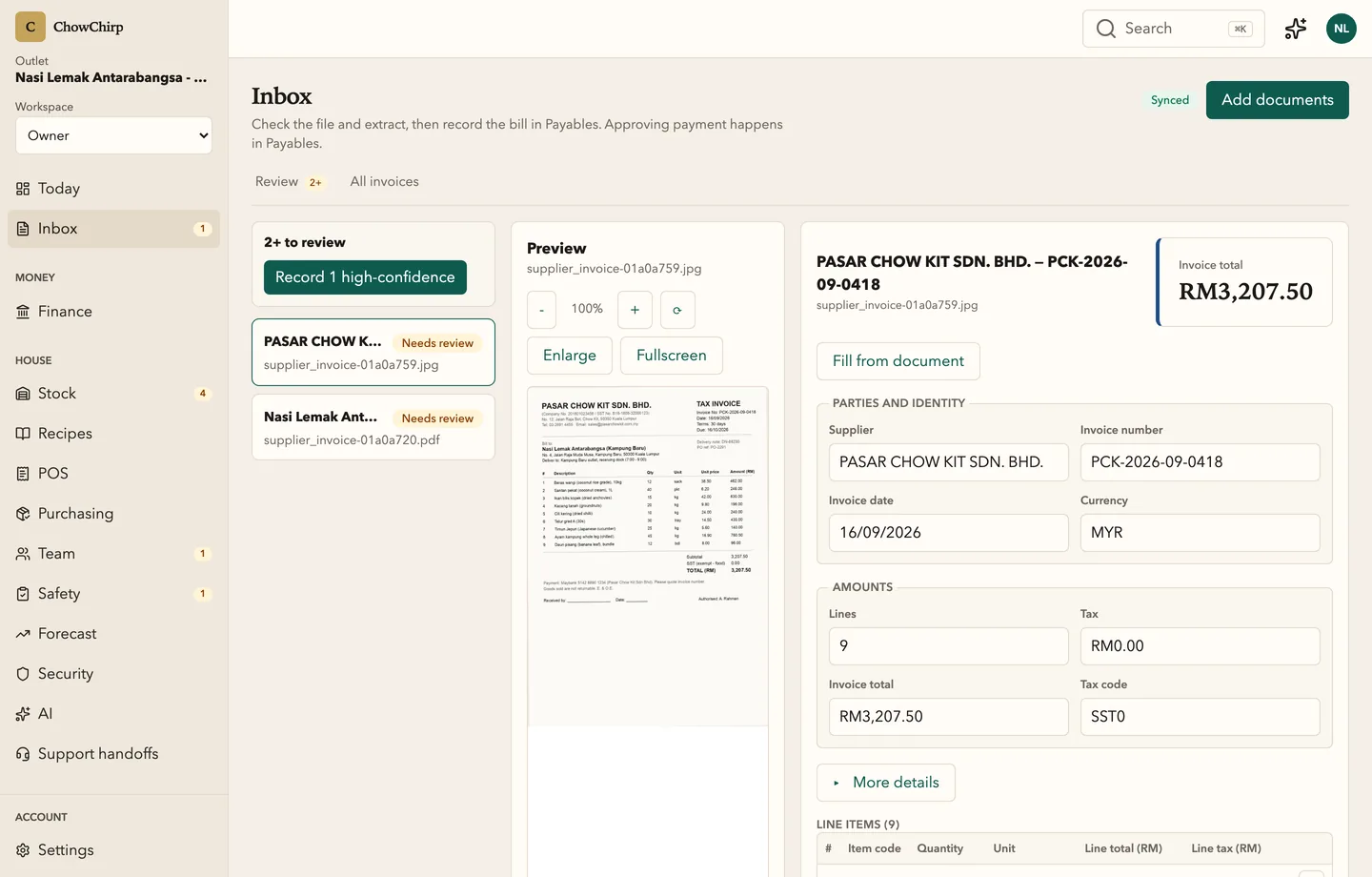
Supplier invoices, credit notes and delivery notes go from a photo to an approved bill in one screen. The AI fills the fields, a person checks the exceptions, and one approval posts to payables and stock.

Who it is for
Owners who want to know food cost this week, not next month.
Managers who receive the deliveries and the paper.
Accountants who need clean, matched bills with the source attached.
What you can do
Capture on the spot
Use the camera on your phone, drop in a PDF, JPEG, PNG or WebP, or save a capture for later. If the connection drops, captures queue on the phone and upload when it returns.
Let the AI read it first
Supplier, invoice number, date, line items, tax and total are filled in for you. Nothing is accepted on your behalf. You see what it read and you decide.
Review with the keyboard
Arrow keys move through the queue. Cmd+Enter accepts a valid document. Plus and minus zoom the preview. A clean invoice takes seconds.
Accept the confident ones in bulk
Documents the AI read with 95% confidence or higher can be accepted together. Anything less waits for a person.
Catch duplicates before they cost you
Every file is fingerprinted before upload. A repeat is blocked with a clear message and an explicit override if it really is a new bill.
One approval, three results
Approving a bill records it in payables, records the purchase lines in stock and updates the supplier price history. If something fails halfway, the document stays recoverable, never lost.
Keep the library searchable
Search, sort and filter every document by status: to review, approved, blocked or with issues. Deep links open a document straight from the audit trail.
Handle blocked files safely
Files that fail the virus scan go to a blocked workbench. Request a rescan, release a false positive, place a legal hold or dispose of the file, with the reason recorded.
How it works
Capture
A manager photographs the invoice at the receiving dock or forwards the PDF. The file is scanned and appears in the review queue.
Review
The AI draft fills the form. The reviewer checks supplier, total and tax, fixes anything the AI missed, and links the purchase order or delivery note.
Approve
One approval posts the bill. Payables, stock and supplier prices update together, and the approval is stamped with the reviewer's name.
Built to be checked
- Bulk accept is offered only for documents with an extraction confidence of 95% or higher. In the product
- Files are fingerprinted with SHA-256 before upload, so a duplicate is blocked before it is stored. In the product
- Approval posts to payables and stock in two recorded steps. If the second step fails, the document shows an incomplete state with a retry, instead of disappearing. In the product
Honest limits
Frequently asked questions
What kinds of documents can I capture?
Supplier invoices, credit notes, delivery notes and receipts, as PDF, JPEG, PNG or WebP. Petty cash receipts use the same pipeline from the finance screens.
How accurate is the AI reading?
It depends on the document. Printed invoices from regular suppliers read well; handwritten notes need more checking. That is why nothing is accepted without a person, and why bulk accept only covers documents the AI is at least 95% sure about.
Does it work in Malay and English?
Yes. The screens are in English or Bahasa Melayu, and the AI reads invoices written in Malay, English or a mix.
What happens if a file is a duplicate?
The upload is blocked with a message that names the existing document. If it really is a new bill, you can upload anyway and the override is recorded.
Can my accountant see the source document?
Yes. Every approved bill keeps its original file, and exports for your accountant reference the document.
Related modules
Finance and payables
Every approved bill lands on one aging board, matched to its purchase order and delivery. Petty cash, cash position, SST and e-Invoice records and the month-end close live in the same place, with the evidence attached.
Stock
Receive deliveries against purchase orders, count stock on a phone, log waste and transfers, and see what every balance is based on. Low-confidence numbers tell you which count would fix them.
Purchasing
Requisitions, purchase orders, quotes, supplier comparison and receiving in one numbered pipeline. Every order carries Malaysian tax codes and links forward to the delivery and the invoice.
See ChowChirp on your own invoices.
A 30-minute walkthrough on a screen share. Bring three real supplier invoices and we will run them through the review loop live.